Production and Beta
Everything you do here affects the real production system. Data you create, trips you submit, and approvals you trigger are not sandboxed and may impact real business records.
Before doing anything:
- Double-check you are on the testing URL, not the customer URL.
- Do not approve, reject, or modify anything you did not create yourself.
- Do not use real personal or company data in test records.
- Clean up test data after each session where possible.
Environments
| Purpose | URL | Who uses it |
|---|---|---|
| Testing | beta.xperise.com | Internal team only — use this for all testing |
| Customer production | app.xperise.com | Real customers — do not use this for testing |
If you are on app.xperise.com, stop immediately and switch to beta.xperise.com.
Test Accounts
Corporate Owner Account
| Field | Value |
|---|---|
| phuongto.demo@uts.network | |
| Role | Corporate Owner |
Trip Proposal Testing Accounts
These accounts are used to test the end-to-end trip proposal and approval workflow.
| Role | |
|---|---|
| Requester | tainguyen.uts+prod@gmail.com |
| Approver — Level 1 | tainguyen.uts+prod@gmail.com |
| Approver — Level 2 | giangnguyen.uts+account+03@gmail.com |
| Admin | tainguyen.uts+prod@gmail.com |
| Accountant | giangnguyen.uts+account+03@gmail.com |
All test accounts above use the same password: 12345678
This password is intentionally simple for internal testing convenience. Never use this password on any real or customer-facing account.
Test Resources
Hotel Booking
Use the link below to access the designated test hotel property. This property is set up specifically for testing and should not be used for real bookings.
Pre-configured parameters:
| Parameter | Value |
|---|---|
| Property | VCB-TEST-13227 |
| Number of adults | 2 |
| Number of children | 0 |
| Number of rooms | 1 |
The check-in and check-out dates in the link above are pre-set. Adjust them in the URL if needed for your test scenario.
Flight Booking
Flight bookings on the production/beta environment interact with real airline systems. A booking not cancelled in time may result in an actual ticket charge.
Allowed:
-
Vietnam Airlines only. Do not test with any other airline.
-
Domestic flights only. Never test international routes.
-
Provider: Datacom – Hong Ngoc Ha only. When selecting a fare, only pick tickets that show the
Hbadge on the fare card. Tickets showing onlyN(or any other badge) are from a different provider and must not be used for testing.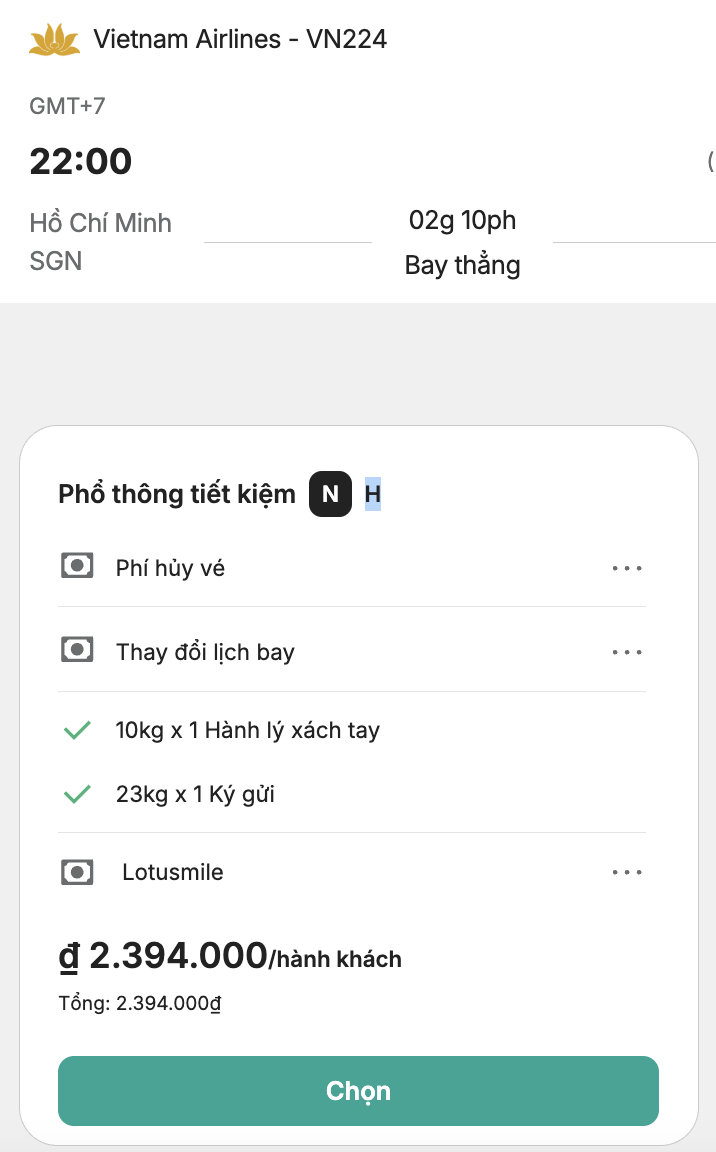
-
Departure date must be at least 1 month from your test date to allow enough time for cancellation.
-
Use real passenger names as required by the airline ticketing system.
Required steps before and after testing:
- Before booking — confirm with Giang or another Backend engineer that the environment is ready and the test is safe to proceed.
- After booking — cancel the booking on the same day. Do not leave any flight booking overnight.
- After cancellation — double-confirm the cancellation is complete with:
- Giang or the Backend engineer who approved the test
- Operation team: Thuy Do and Van Le
Never test an international flight. Never test with airlines other than Vietnam Airlines. Only select fares with the H badge (Datacom – Hong Ngoc Ha provider) — do not book any fare showing only N or another provider badge. Failure to cancel on the same day may result in a real charge.
Testing Rules
- Use the beta URL only. Never test on
app.xperise.com. - Use designated test accounts only. Do not log in with a real user's credentials.
- Use realistic but fake data — except for flight bookings, which require real passenger names.
- Do not leave incomplete test flows. If you start a trip proposal, complete or cancel it — do not leave it in a pending state that could block another tester.
- Coordinate with the team before running tests that involve shared accounts (e.g. approval flows where one account acts as both requester and approver).
- Report unexpected behavior immediately. If something in the production environment looks wrong, do not attempt to fix it yourself — notify the team.